
Driver’s ed, inside your facility.
Hands-on simulator practice that gets youth ready to drive after release.
On-siteNo vehicles or off-site trips
Self-pacedFits any length of stay
SecureNo internet or network connection required
Book a demo
In-person or virtual. * Required.
Or call 877-746-8332. Privacy policy. Protected by reCAPTCHA.
Youth will need to drive after release. Few have had the chance to practice.
Driving is how most people reach work, school, and appointments. Inside a secure facility, the usual way to learn it isn’t available.
Getting there takes a car
In 2024, 69.2% of U.S. workers drove alone to work. A job offer, a class, or a check-in across town is hard to keep without a way to get there.
Road time isn’t an option
In custody, there’s no practicing in a car on public roads. Without another way to practice, driver’s ed stays a textbook subject.
Stays vary in length
Some youth are with you for weeks, others for months. A program has to deliver value in a few short sessions and still suit a longer stay.
Commuting figure from the U.S. Census Bureau’s American Community Survey, 2024. Read our guide to driving readiness in re-entry plans. A simulator builds skill and confidence. It does not resolve legal or licensing barriers.
Hands-on driving practice, inside your facility.
Virtual Driver Interactive (VDI) makes driving simulators used by more than 500 programs across all 50 states, including juvenile justice programs. Youth use a steering wheel, pedals, and a screen to work through lifelike road scenes.
They can spot a hazard, make a choice, and see what happens next, all without a vehicle, a road, or a trip outside.
Make mistakes teachable.
A crash in the simulator costs nothing. Talk through what went wrong, then let them try again.
Watch: driving simulators for juvenile detention centers.
Practice the choices every new driver faces.
Our Novice Driving Essentials (NDE) lessons turn key driving topics into tasks youth can try. Use them to build on what you teach in your education or life-skills program.
Spot hazards
Look for trouble ahead and practice how to respond.
Leave enough space
Work on following distance and space around the car.
Handle intersections
Practice turns, signals, and choices at busy crossings.
Share the road
Watch for people, bikes, and other vehicles.
Drive in changing weather
Try road scenes that include poor weather and tough conditions.
Understand distractions
See how lost focus can affect a drive.
14 lessons. About three hours in total. Each lesson is a short session of its own, so youth make real progress in a short stay and pick up at the next lesson in a longer one.
See every youth’s progress. Show your program’s results.
VDI’s Vantage reports show lessons finished, time spent, scores, and key driving choices. Use them to coach each youth and to document participation in your program.
1. Start with a baseline
A pre-assessment shows where each youth is starting, whatever their experience.
2. Review the drive
See what happened in each lesson and where more practice is needed.
3. Document the progress
A post-assessment and progress reports give staff a record to share in transition planning.
Add driver’s ed to the room you already have.
Start with your space, your population, and your goals. VDI can help you explore a setup that works for your classroom or vocational area.
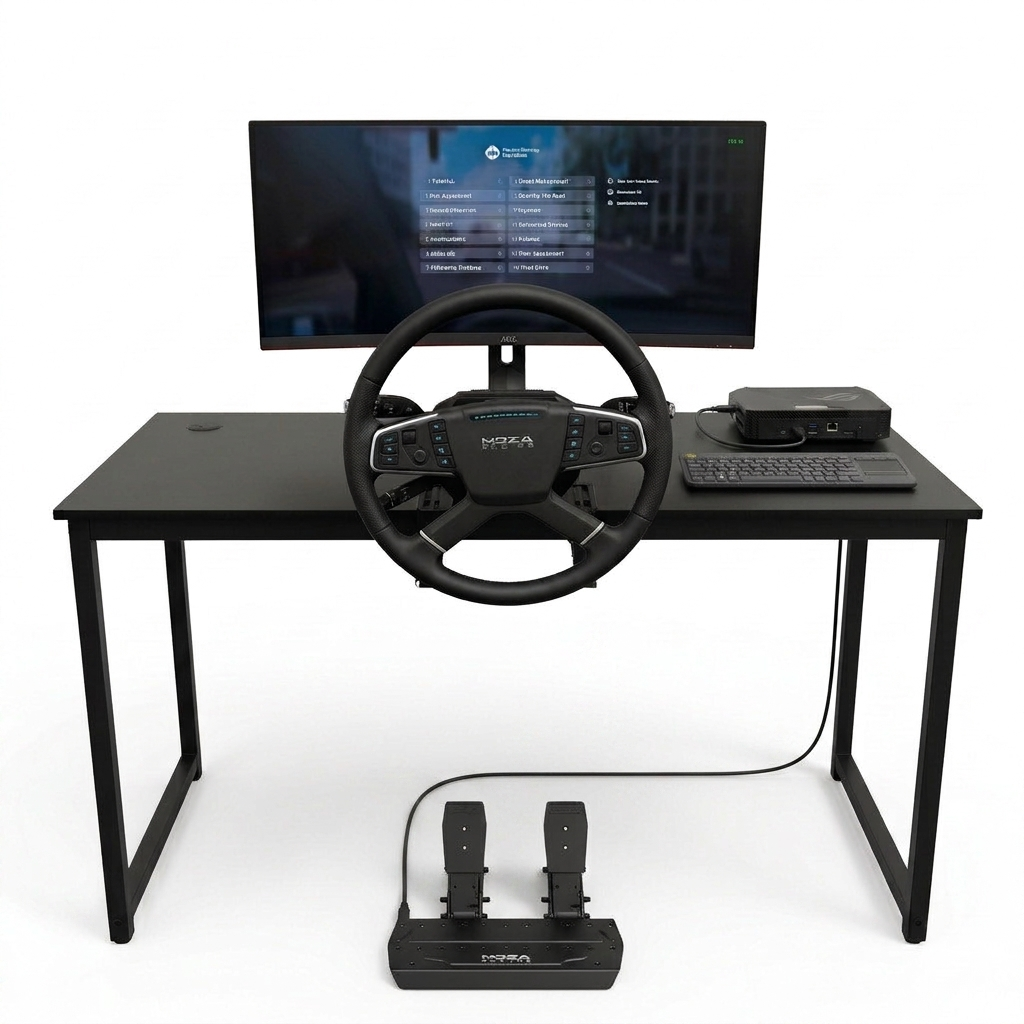
Desktop Series
A compact setup with a steering wheel and pedals for hands-on practice at a desk.
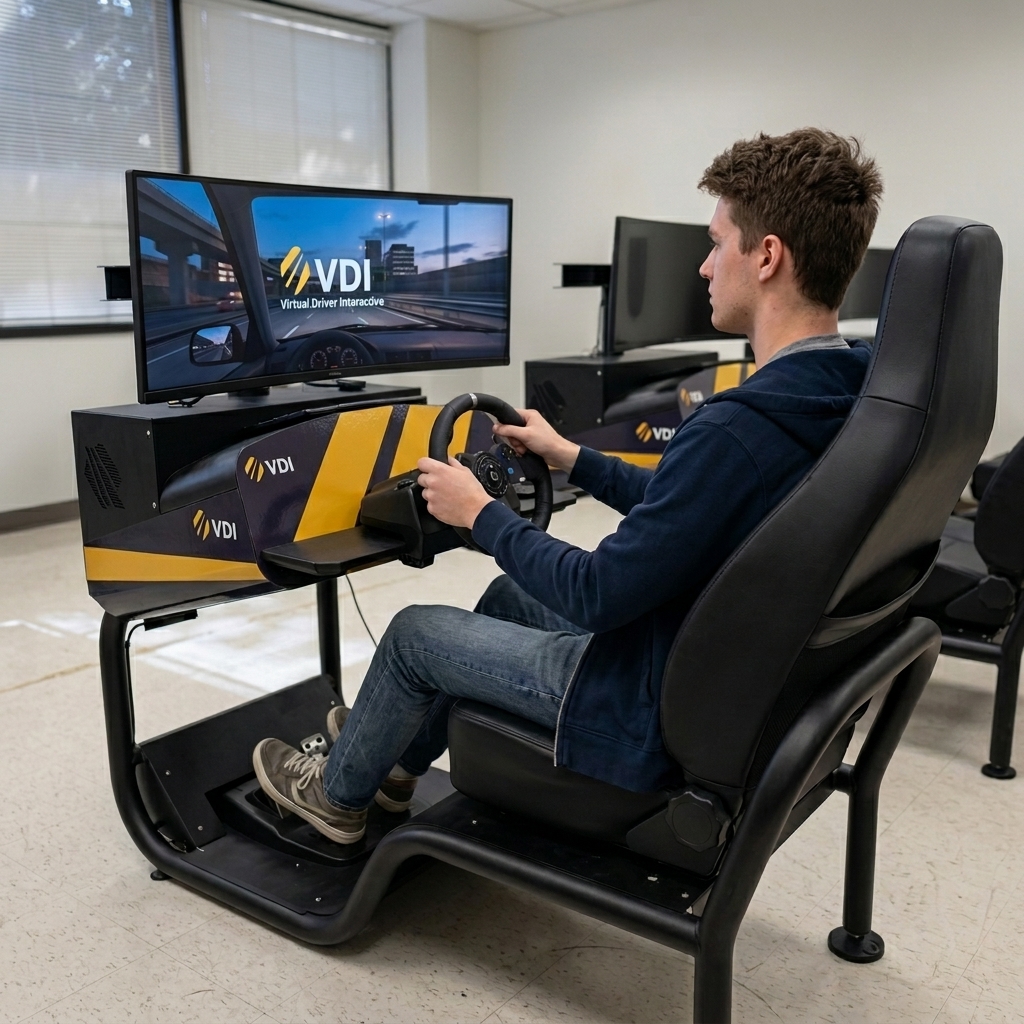
Full Cab Series
A car-like setup with its own seat and controls for a dedicated practice space.
Ask about funding. Some facilities look to Title I, Part D (Neglected and Delinquent) funds for education programs like this. See VDI’s grant resources, and ask us about setup, staff training, and support.
Built to run inside your routine.
A new program has to work with your space, your staff, and your rules. Here is what to expect.
Everything stays on-site
All practice happens in your classroom or vocational area. No vehicles, no transport, and no trips into the community.
Self-contained equipment
The Full Cab Series is one unit with its own seat, wheel, and pedals. Plug it in and it’s ready to go, and built-in wheels let staff move it between rooms. The Desktop Series sets up on a desk.
Staff see every session
Vantage reports show who finished which lesson, how long it took, and how they scored. Staff can account for program time, youth by youth.
Your questions answered before you buy
Bring your security and IT leads to the demo. The simulators need no internet or network connection. VDI will walk through power, cabling, and supervision needs for the exact setup you’re considering.
Ways facilities fund a simulator program.
Many facilities pay for education programs with federal and state funds. These are common places to start.
Title I, Part D
Neglected and Delinquent funds support education for youth in state-run institutions. The goal is a successful move to school or work after release.
Perkins (CTE)
Perkins funds support career and technical education. They may fit if driver education sits within your vocational program.
State and justice grants
State highway safety offices and justice assistance grants fund some driver safety and rehabilitation programs. Options vary by state.
Eligibility varies. Check with your state’s grant coordinator before you apply. See VDI’s state and federal grant resources.
Hear from juvenile justice programs that use VDI.
A popular class
“The class is very popular with the young men we serve and offers them the opportunity to develop valuable life skills.”
Jeff Canfield
Vocational Coordinator
Oregon Youth Authority
Practice stays on-site
“The simulator gives our youth the opportunity to get practical and realistic experience without going into the community.”
Jesse Augenstein
Ohio Department of Youth Services
Cuyahoga Hills Juvenile Correctional Facility
Ready for a license
“It allows them to drive in the most realistic conditions possible and is developing their skills and preparing them for when they will obtain a driver’s license in the future.”
Clay Chandler
Principal
Shenandoah Valley Juvenile Center
Quotes are from facility staff about their own experience with VDI.
Two simulators. One new Traffic Safety course.
The Oregon Youth Authority bought two VDI simulators and began offering a Traffic Safety course to the young men it serves.
“Since our students are incarcerated, this is a safe and effective way to develop these skills and prepare them for a successful transition to the community.”

Oregon Youth Authority
2VDI simulators
1new Traffic Safety course
From Jeff Canfield, Vocational Coordinator, in a VDI testimonial.
Answers for your next step.
Does this replace behind-the-wheel training?
No. Simulation adds practice alongside classroom and behind-the-wheel instruction. It does not replace your state’s licensing requirements. Any required road instruction and testing still happens after release.
How long does the program take?
Novice Driving Essentials has 14 lessons and takes about three hours of simulation time in total. Youth work through it at their own pace, one lesson at a time.
What if someone leaves before finishing?
Vantage reports show which lessons each youth has completed, the time spent, and the scores. Staff can print a report for the transition file.
Is any driving experience needed?
No. The program starts with a tutorial and a pre-assessment, so everyone begins from their own starting point.
What do we need in the room?
The Desktop Series sets up on a desk. The Full Cab Series is self-contained: plug it in and it’s ready to go. No internet or network connection is required. VDI will confirm space and power needs for the exact setup you choose.
How do facilities pay for it?
Many look to Title I, Part D funds, Perkins funds, or state grants. See the funding options above and ask VDI about pricing for your setup.
What happens after I request a demo?
Your request goes to the VDI team, who will contact you to plan a time. In-person and virtual demos are available. Sending the form starts a conversation. It does not commit you to anything.
Picture VDI in your facility.
Bring your education director, a teacher, or your re-entry team. See the practice, the reports, and the equipment in one demo.
- Try a lesson. See what youth do behind the wheel.
- See the reports. Learn how staff track and document progress.
- Talk about your facility. Explore a setup, funding, support, and pricing.
In-person and virtual demos are available. VDI will follow up to plan a time with you. Not ready for a demo? Email us a question or read our guide to driving readiness in re-entry plans.
Book a demo
In-person or virtual. * Required.
Or call 877-746-8332. Privacy policy. Protected by reCAPTCHA.
Virtual Driver Interactive · Practice for the road ahead.
Simulation adds practice alongside classroom and behind-the-wheel instruction. It does not replace your state’s licensing requirements. Check your state’s rules before counting simulator time toward driver education credit.